
Table of Contents
On-Page SEO Basics: The Anatomy of a High-Ranking Webpage
If you’ve ever published a blog post and waited weeks for it to show up anywhere on Google, you already know the frustration. Mastering on-page SEO basics is the key to fixing this.
Think of it like labeling boxes before a house move. You could pack everything perfectly, but if nothing’s labeled, nobody knows where to put the lamp or the dinner plates. On-page SEO basics form that labeling system for your website. Get it right, and search engines can file your content exactly where it belongs. Get it wrong, and even brilliant content sits buried on page four.
This guide walks through the four building blocks that make up a well-structured webpage: title tags, headings, alt text, and URLs. These on-page SEO basics ensure your content ranks well.
Title Tag & Meta Description Formula
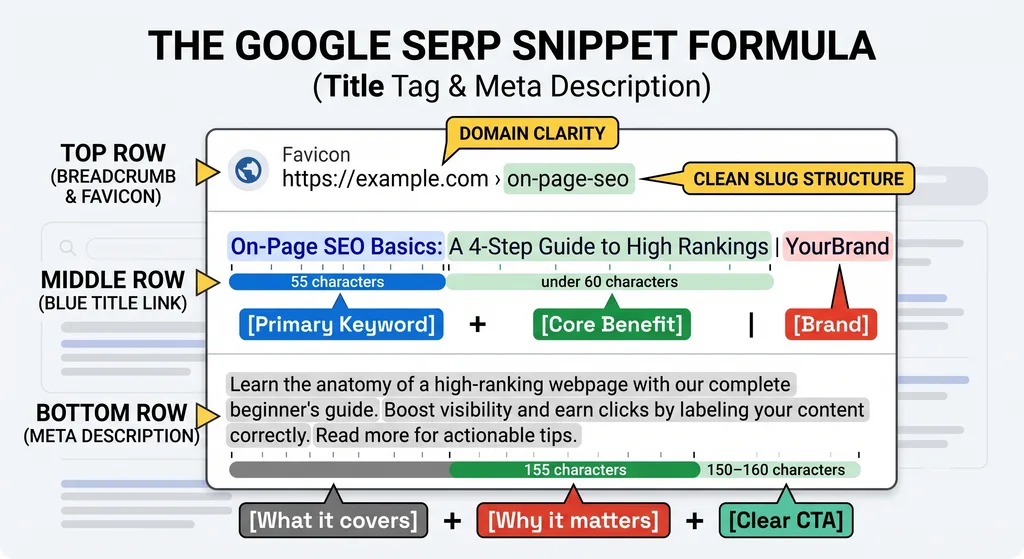
Your title tag is the blue clickable headline in search results. Your meta description is the gray text underneath. They are core on-page SEO basics for search visibility.
Here’s a formula that works for most pages:
- Title tag: Primary keyword + a specific benefit or angle + brand name (if space allows). Keep it under 60 characters so it doesn’t get cut off.
- Meta description: One sentence stating what the page covers, one sentence stating why it’s useful, and a soft call to action. Aim for 150-160 characters.
A weak title tag looks like this: “Home | Blog.” A strong one looks like this: “On-Page SEO Basics: 4 Elements Every Page Needs.”
The difference isn’t subtle. One tells a searcher nothing. The other tells them exactly what they’ll get if they click.
One mistake I see constantly: stuffing the same keyword into the title three times hoping it’ll rank better. It won’t. Google’s own guidance is clear that titles should be written for people first, descriptive and unique to each page, not keyword-stuffed strings. If you’re unsure how specific you should get, the Google Search Central Guidelines are a solid reference point straight from the source.
Takeaway: Write your title and description like a short ad for your own page. If it wouldn’t make a real person want to click, rewrite it.
Structuring H1, H2, and H3 Tags
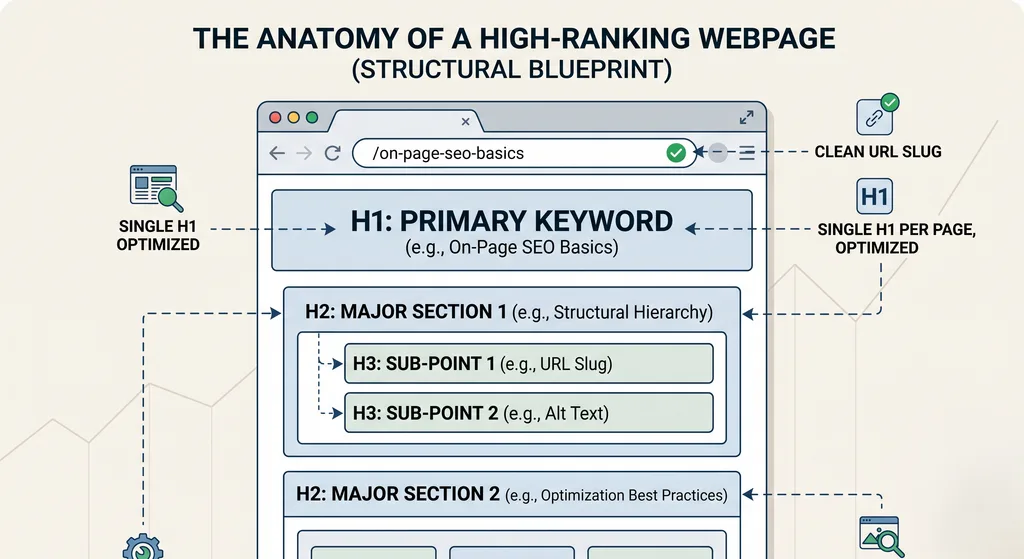
Headings aren’t decoration. They’re the skeleton of your page, and crawlers use that skeleton to figure out what matters. Implementing these on-page SEO basics creates a clear hierarchy.
The rule is simple, even if people break it constantly:
- One H1 per page. This is your main title and should contain your primary keyword naturally — not forced, just present.
- H2s mark major sections. Each one should represent a distinct sub-topic, not a random sentence.
- H3s break down H2s further. Use them for sub-points, not for skipping levels (don’t jump from H1 straight to H3).
A page with no heading structure — just walls of text — is harder for both readers and crawlers to parse. I’ve reviewed plenty of local business sites where the entire homepage copy sat under one giant paragraph with zero subheadings. Traffic was flat for months, and once proper heading hierarchy went in, the pages became noticeably easier to scan and crawl.
Here’s a quick comparison of good versus poor heading structure:
| Element | Poor Structure | Good Structure |
|---|---|---|
| H1 | Missing or duplicated | One clear, keyword-relevant H1 |
| H2s | Random phrases, no logic | Each covers one distinct sub-topic |
| H3s | Used to skip levels or for styling | Used only to break down an H2 further |
| Keyword use | Stuffed into every heading | Appears naturally once or twice |
If you’re not confident structuring this yourself, working with someone who does it daily — like the technical SEO and on-page optimization services — can save you from the trial-and-error most people go through alone.
Takeaway: Headings should read like a table of contents. If someone scanned only your H2s, they should understand the whole page.
Optimizing Image File Names & Alt Text
Images carry SEO weight that most people ignore entirely. Every picture on your page is an opportunity to tell crawlers more about the content — or a missed one.
Two things matter here:
- File names. “IMG_4821.jpg” tells Google nothing. “on-page-seo-checklist.jpg” tells it exactly what’s in the image.
- Alt text. This is the written description attached to an image, read by screen readers and crawlers alike. It should describe the image accurately and, where it fits naturally, include relevant keywords — not a keyword list, an actual description.
Good alt text: “Screenshot of a title tag and meta description shown in Google search results.” Bad alt text: “seo, title tag, meta description, google, ranking, best seo.”
The second one isn’t just unhelpful — it can look like spam to search engines and does nothing for visually impaired users relying on a screen reader.
Takeaway: Name files and write alt text as if you’re describing the image to someone who can’t see it. That’s genuinely the whole test.
Clean URL Slugs Without Stop Words
Your URL slug is the part after your domain name — the bit that describes the specific page. A messy slug looks like this:
yoursite.com/post?id=4821&cat=2
A clean one looks like this:
yoursite.com/on-page-seo-basics
Short, readable, and descriptive. Here’s what makes a slug work well:
- Keep it short — ideally under 60 characters.
- Use hyphens, not underscores, to separate words.
- Drop stop words like “the,” “a,” “and,” “of” where they’re not essential to meaning.
- Include the primary keyword once, not repeated.
- Avoid dates, numbers, or tracking parameters unless they serve an actual purpose.
People underestimate how much a clean slug helps. It’s not just a ranking nicety — it builds trust. A reader glancing at a URL before clicking can tell instantly whether a page is relevant, and a tidy slug looks more credible than a jumble of numbers and symbols.
Takeaway: If you can’t read your slug out loud and understand the page topic, it needs trimming.
Putting It All Together
On-page SEO basics aren’t complicated once you see them as a system rather than a checklist to rush through. Title tags and meta descriptions earn the click. Headings organize the content so crawlers and readers both follow along. Image file names and alt text add context that’s otherwise invisible. Clean URLs tie the whole thing together with a readable, trustworthy address.
None of these elements works in isolation — they reinforce each other, and skipping one weakens the rest.
FAQ
What are the most important on-page SEO basics for a beginner? Start with your title tag, meta description, and heading structure. These are the elements search engines and readers both see first, and they’re the fastest to fix on an existing page.
Does alt text actually affect rankings? It supports image search visibility and accessibility, and well-written alt text contributes to overall page relevance signals. It’s not a standalone ranking factor, but it’s part of a complete on-page setup.
How long should a title tag be? Generally under 60 characters so it doesn’t get truncated in search results. Focus on clarity over hitting an exact number.
Should every page have exactly one H1? Yes. One H1 per page keeps the content hierarchy clear for both search engines and readers.
Are stop words really bad for URL slugs? Not harmful exactly, but removing unnecessary ones like “the” or “and” makes slugs shorter, cleaner, and easier to read at a glance.
{ “@context”: “https://schema.org”, “@type”: “FAQPage”, “mainEntity”: [ { “@type”: “Question”, “name”: “What are the most important on-page SEO basics for a beginner?”, “acceptedAnswer”: { “@type”: “Answer”, “text”: “Start with your title tag, meta description, and heading structure. These are the elements search engines and readers both see first, and they’re the fastest to fix on an existing page.” } }, { “@type”: “Question”, “name”: “Does alt text actually affect rankings?”, “acceptedAnswer”: { “@type”: “Answer”, “text”: “It supports image search visibility and accessibility, and well-written alt text contributes to overall page relevance signals. It’s not a standalone ranking factor, but it’s part of a complete on-page setup.” } }, { “@type”: “Question”, “name”: “How long should a title tag be?”, “acceptedAnswer”: { “@type”: “Answer”, “text”: “Generally under 60 characters so it doesn’t get truncated in search results. Focus on clarity over hitting an exact number.” } }, { “@type”: “Question”, “name”: “Should every page have exactly one H1?”, “acceptedAnswer”: { “@type”: “Answer”, “text”: “Yes. One H1 per page keeps the content hierarchy clear for both search engines and readers.” } }, { “@type”: “Question”, “name”: “Are stop words really bad for URL slugs?”, “acceptedAnswer”: { “@type”: “Answer”, “text”: “Not harmful exactly, but removing unnecessary ones like \”the\” or \”and\” makes slugs shorter, cleaner, and easier to read at a glance.” } } ] }