
How to Claim and Verify Your Google Business Profile in 2026
If you’ve tried to claim Google Business Profile for your shop, clinic, or office recently, you already know it’s not as simple as it used to be. Google has tightened its verification process, rolled out more video checks, and gotten trigger-happy with suspensions — all in the name of fighting fake listings. Good news for honest business owners, bad news for anyone who hits a bug or a slow postcard mid-process.
I’ve walked dozens of local businesses through this exact headache, and the complaints are always the same three things: video verification glitching out, postcards vanishing somewhere between Delhi and a village pincode, and listings getting suspended overnight for no obvious reason. This guide covers all three, plus the category choices that quietly affect whether you show up in local searches at all.
If you’d rather hand this off entirely, our team handles digital marketing services in Pathanamthitta including profile setup and verification troubleshooting — but if you want to do it yourself, here’s exactly how.
Video vs Instant Verification
Google now offers a few verification paths, and which one you get depends on your business category, history, and sometimes just luck. The two you’ll run into most in 2026 are instant verification and video verification.
Instant verification happens automatically if you’ve already verified your business with Google Search Console using the same domain. It’s rare for small local businesses unless you manage your own website. Most shop owners won’t see this option at all.
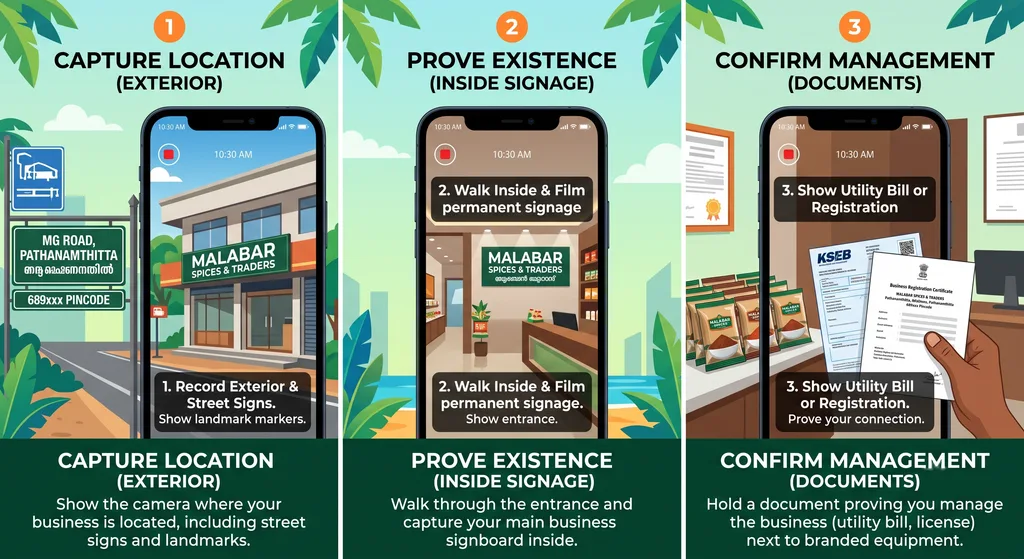
Video verification is now the default for a huge chunk of categories — especially home services, clinics, and anything without a fixed public-facing storefront. You record a live video walkthrough showing your signage, interior, and proof you’re physically present at the listed address.
Here’s where people get stuck:
- The app says “recording failed” even after multiple attempts — usually a bandwidth issue, not a Google bug. Switch to Wi-Fi before trying again.
- The video gets rejected for not showing the exterior signage clearly. Film it in daylight, and walk slowly — don’t pan fast.
- Verification option disappears entirely after a failed attempt. This usually means you need to wait 24–48 hours before Google re-offers you a method.
Takeaway: Film during business hours, in good light, and show your signage, interior, and ID or paperwork with your business name on it in one continuous take. Don’t cut the video or you’ll likely get rejected and have to start over.
Handling Postcard Delays in Rural Districts
Postcard verification is still alive, and for a lot of businesses outside major cities — including plenty in and around Pathanamthitta district — it’s still the only option Google offers. The problem is timing. Google quotes 5–14 days, but rural and semi-rural pincodes routinely see delays well past that, especially during festival seasons when postal volume spikes.
A few things that actually help:
- Double-check the address format before requesting the postcard. Mixed English/Malayalam address lines, missing landmarks, or inconsistent house numbering are the single biggest cause of lost postcards in this region.
- Add a care-of name your postal worker will recognize, not just the legal business name — rural delivery often relies on local familiarity more than exact address matching.
- Request a resend after 14 days, not before. Requesting too early can sometimes cancel the original postcard mid-transit.
- Track your request status inside the Business Profile dashboard rather than guessing — it shows the exact date the postcard was mailed.
If it’s been over three weeks with no postcard, contact Google Business Profile support and ask specifically about alternate verification — phone or email verification is sometimes offered after repeated postcard failures, though it’s not available for every category.
Takeaway: Most “lost” postcards are actually address formatting problems, not postal failures. Fix the address before you request a resend, not after.
Primary vs Secondary Categories
This part gets overlooked constantly, and it matters more than most people realize for local search rankings. Your primary category is the single biggest signal Google uses to decide which searches your business shows up for. Pick the wrong one, and you can be the best business in town and still invisible for the searches that matter.
Primary category rules of thumb:
- Choose the most specific category that still accurately describes your core business — “Ayurvedic Clinic” beats generic “Clinic” if that’s genuinely your focus.
- Don’t pick a broader category just because it has more search volume. Mismatched categories hurt relevance and can trigger review flags.
- You can only have one primary category, so it should reflect what you’d say if someone asked “what do you actually do?”
Secondary categories let you capture adjacent searches without diluting your main listing — a bakery that also does catering can add “Caterer” as secondary, for instance.
| Category Type | Limit | Purpose | Common Mistake |
|---|---|---|---|
| Primary | 1 | Main ranking signal | Choosing too broad a category |
| Secondary | Up to 9 | Captures related searches | Adding irrelevant categories to “catch more traffic” |
Takeaway: Review your category choice every six months or so — Google regularly adds new, more specific categories, and switching to one that matches you better can meaningfully improve local visibility.
Avoiding Suspensions
This is the part that scares business owners the most, and fairly so. A suspended profile disappears from Maps and Search instantly, often with zero warning and a vague reason attached. Reinstatement can take weeks.
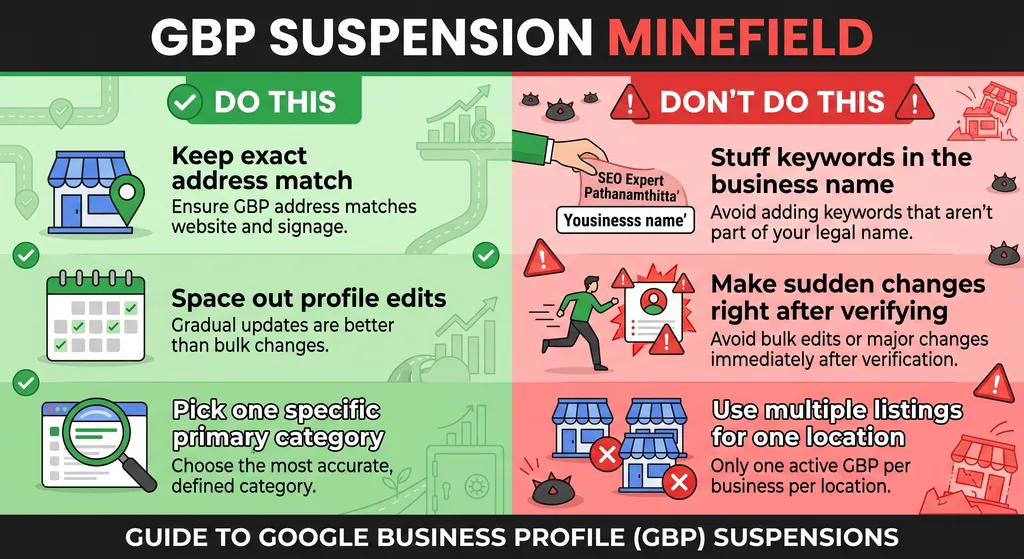
Common triggers worth knowing before they happen to you:
- Address mismatches — your listed address doesn’t match what’s visible on your storefront or website.
- Keyword stuffing in the business name — adding your services or location into the name field (“Rahul Electricals Pathanamthitta Best Service”) is a fast way to get flagged.
- Multiple listings for one location — duplicate or old unused profiles at the same address trigger automated suspicion.
- Sudden edits after verification — changing your category, name, or address right after getting verified looks suspicious to Google’s automated systems, even if the change is legitimate.
- Bulk review activity — a sudden spike in reviews, especially similar-sounding ones, can get both the reviews and the profile flagged.
According to Google Business Profile Help, keeping your business information accurate and consistent with how it appears in the real world is one of the core requirements for staying in good standing — and it’s the first thing their support team checks when reviewing a suspended listing.
Takeaway: If you need to make changes, space them out and keep documentation — business licenses, utility bills, signage photos — ready to upload quickly if Google asks for reinstatement proof.
Quick Reference: Verification & Suspension at a Glance
| Issue | Likely Cause | What to Do |
|---|---|---|
| Video verification fails repeatedly | Poor lighting/bandwidth, rushed filming | Re-film slowly in daylight, use Wi-Fi |
| Postcard never arrives | Address formatting, rural delivery gaps | Fix address, wait 14 days, then request resend |
| Wrong category showing | Overly broad primary category chosen | Switch to most specific accurate category |
| Listing suddenly suspended | Name/address mismatch or rapid edits | Gather proof docs, file reinstatement request |
FAQ
How long does it take to claim Google Business Profile in 2026? If instant or video verification works on the first try, it can take under 24 hours. Postcard verification, especially in rural areas, can stretch to three or four weeks.
Can I use a home address to claim Google Business Profile? Yes, but you’ll need to mark it as a service-area business if you don’t want the exact address shown publicly, and video verification is more likely to be required.
What happens if my video verification keeps failing? After repeated failures, Google often disables the video option temporarily and offers postcard verification instead. Waiting 24–48 hours and trying from a stronger connection can also resolve it.
Why was my Google Business Profile suspended with no warning? Most unexplained suspensions trace back to name, address, or category inconsistencies, or sudden profile edits right after verification. Reviewing Google Business Profile Help’s guidelines before editing your listing can help you avoid common triggers.
Should I hire someone to claim and verify my profile for me? If you’ve already hit a verification wall or a suspension, getting help can save weeks of back-and-forth — it’s one of the services we offer as part of our digital marketing work in the Pathanamthitta area.
Final Thoughts
Claiming and verifying a Google Business Profile in 2026 isn’t hard in theory — it’s the edge cases that trip people up: a glitchy video check, a postcard that never shows up, a category that quietly limits your reach, or a suspension that lands out of nowhere. Get the fundamentals right — accurate address, honest categories, patient postcard handling — and most of these problems never happen in the first place. And if they do, now you know exactly where to look first.